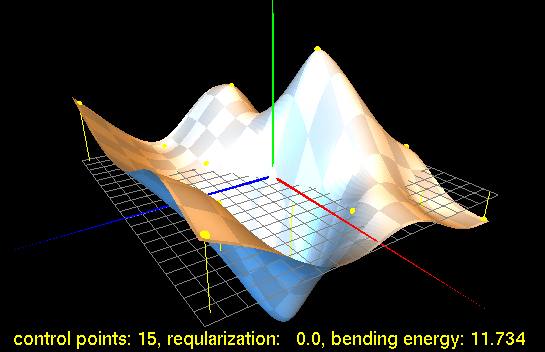
Screenshot from the TPS demo
© 2003,2004,2005 by Jarno Elonen - URN:NBN:fi-fe20031422
Based mostly on "Approximation Methods for Thin Plate Spline Mappings and Principal Warps" by Gianluca Donato and Serge Belongie, 2002.
Thin Plate Spline, or TPS for short, is an interpolation method that finds a "minimally bended" smooth surface that passes through all given points. TPS of 3 control points is a plane, more than 3 is generally a curved surface and less than 3 is undefined.
The name "Thin Plate" comes from the fact that a TPS more or less simulates how a thin metal plate would behave if it was forced through the same control points.
Thin plate splines are particularily popular in representing shape transformations, for example, image morphing or shape detection/matching. (If you are interested in this application, see the separate example file in the bottom of this page.)
Consider two equally sized sets of 2D-points, A being the vertices of the original shape and B of the target shape. Let zi=Bix - Aix. Then fit a TPS over points (aix, aiy, zi) to get interpolation function for translation of points in x direction. Repeat the same for y.
In some cases, e.g. when the control point coordinates are noisy, you may want to relax the interpolation requirements slightly so that the resulting surface doesn't have to go exactly exactly through the control points. This is called regularization and is controlled by regularization parameter λ. If λ is zero, interpolation is exact and as it approaches infinity, the resulting TPS surface is reduced to a least squares fitted plane ("bending energy" of a plane is 0). In our example, the regularization parameter is also made scale invariant with an extra parameter α.
Given set C of p 3D control points....
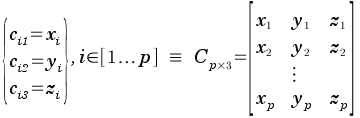
...and regularization parameter λ, solve unknown TPS weights w and a from linear equation system...

..., where K, P and O are submatrices and w, a, v and o are column vectors, given by:

Note that L, and thus also its submatrix K, is symmetric so you can calculate elements for upper triangle only and copy them to the lower one. Also, α (mean of distances between control points' xy-projections) is a constant only present on the diagonal of K, so you can easily calculate it while filling up the upper and lower triangles. I is the standard unit diagonal matrix.
Then, once you know values for w and a, you can interpolate z for arbitrary points (x,y) from:

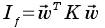
Bending energy (scalar) of a TPS is given by:
(download formulas in MML)
The LU-decomposition used in this example is a generic, direct solver that doesn't scale well as the size of the matrices grow large: it is O(N3). For large sets of control points, there are optimized (and much more complicated) methods for solving the Thin Plate Spline problem (or more generally, RBF or Radial Basis Function interpolation). They are based on iterative numerical solvers (like Gauss-Seidel or the conjugate gradient method) and the assumption that the effect of the control points is mainly local (i.e. only a few neighboring control points contribute majorly to interpolating a given point). These approximations scale well, in the order of O(N log N ) (albeit with pretty high constants).
For a good, readable introduction to these methods (preconditioning, Krylov subspace method, fast multipole algorithm) see: "Radial basis functions: theory and implementations" by Martin Dietrich Buhmann.
Tpsdemo is an example program, a graphical thin
plate spline editor that demonstrates how to implement TPS
interpolation in C++. It uses OpenGL + GLUT for graphics and
Boost uBlas library for
representing large matrices.
Download the whole source code and this explanation (tpsdemo-1.2.tar.gz) or browse individual files:
The binary program only consists of one executable file and doesn't need any texture, model or other data files. To build and run it on a unix variant (with OGL and Boost installed of course), simply type:
Copyright (C) 2003, 2004, 2005 by Jarno Elonen
TPSDemo is Free Software / Open Source with a very permissive license:
Permission to use, copy, modify, distribute and sell this software and its documentation for any purpose is hereby granted without fee, provided that the above copyright notice appear in all copies and that both that copyright notice and this permission notice appear in supporting documentation. The authors make no representations about the suitability of this software for any purpose. It is provided "as is" without express or implied warranty.
(This page and images on it count as documentation of the software and are thus under the same license.)